


Our take: Dave is an excellent banking app for budget-aware users. It offers easy navigation, affordable membership, and access to fast, low-cost paycheck advances.
Mobile Banking App
- Low membership cost
- Cash advance up to $500
- Excellent reviews
- Expedited transfer fees
- Not all users qualify for full advance amount
| Products | Checking account, savings account, paycheck advance |
| Monthly fees | $1 |
| Savings APY | 4.00% |
| ATM network | MoneyPass®: 40,000+ ATMs |
What is the Dave App?
Need cash, like, right now? EarnIn lets eligible users access up to $300 from their earned wages with no interest or mandatory fees.¹ First-time users may be eligible for expedited funding at no cost.²
EarnIn does not charge interest on Cash Outs or mandatory fees for standard transfers, which usually take 1-2 business days. For faster transfers, you can choose the Lightning Speed option and pay a fee to receive funds within 30 minutes. Lightning Speed may not be available at all times and/or to all customers. Restrictions and terms apply; see the Lightning Speed Fee Table and Cash Out User Agreement for details and eligibility requirements. Tips are optional and do not affect the quality or availability of services.
Lightning Speed is an optional service that allows you to expedite the transfer of funds for a fee. Depending on the product, the fee may be charged by EarnIn or its banking partner. Lightning Speed may not be available in all states and/or to all customers. Restrictions and terms apply. See the Lightning Speed Fee Table for details.
Dave, a popular fintech app with more than 12 million members, aims to make everyday banking easy and accessible. T he app offers checking and savings accounts, basic budgeting tools, early paycheck access, and short-term advances through its ExtraCash™ feature.
How it works
Dave’s chief goal is to make money management easier for the average person. It combines banking, budgeting, and cash advances in one handy app.
Spending account
The no-minimum-balance checking account works as your everyday money management hub. Once you set up your Dave account, you can access a digital debit card and order a physical card.
Highlights:
- Choosing direct deposit allows you to get your paycheck up to two days early.
- You can round up every purchase to the nearest dollar, with the spare change automatically going toward your savings.
Goals account
Dave’s Goals feature is a savings account with a 4.00% annual percentage yield (APY). That’s a decent APY. (Check out our list of the best high-yield savings accounts to see how it compares.)
You can open up to three separate sub-accounts to save money for different purposes (e.g., travel, gifts, emergencies).
Budgeting tools
Dave’s spending account includes a budgeting feature. Its main function is to estimate how much money you’ll have left after recurring expenses.
ExtraCash
Dave ExtraCash™ is the app’s standout service. It lets qualifying users access up to $500 of their upcoming paycheck, with no credit check or interest. The standard-speed advance takes two to three days, while an expedited transfer option to an external bank account is available for an extra fee (1.5% of the transfer).
You can choose instant transfer to your Dave checking account for no additional charge with a monthly membership, which costs up to $5.
Side hustles
If you have some spare time, you can explore the app’s side hustle platform. Complete small side gigs, like micro-tasks and paid surveys, for extra cash.
ATM withdrawal
Dave users can withdraw cash fee-free at more than 40,000 MoneyPass® ATMs. Find partnering ATMs through the app’s “Withdraw cash” tab.
Who can use Dave?
Any legal U.S. resident with a U.S. bank account can use the app. Dave only allows one account per device.
Note that approval for ExtraCash depends on your app usage history. Healthy spending habits, recurring deposits, and a positive balance in your linked bank account improve your chances of unlocking the full $500 amount.
Costs
Dave’s basic membership costs only $1 per month and gives you access to several banking tools. (The website indicates that a monthly membership that allows for ExtraCash transfers costs “up to $5.”)
Dave has moved from its old optional tipping model to a 5% flat fee for using the ExtraCash service, with a minimum of $5 and a cap of $15.
Instant transfers of cash advances to a Dave checking account incur no additional charge, but you’ll pay an extra 1.5% to move the money to an external bank account.
Dave pros and cons
Pros
-
Minimal costs (Basic membership starts at $1 per month)
-
Paycheck advance up to $500
-
No late or overdraft fees
-
No minimum balance or credit check requirements
Cons
-
Instant transfer fees may add up, especially with frequent use
-
The budgeting features are quite barebones
Customer support
Dave’s main customer support tool is its in-app chat feature. You can also email [email protected] or call 1-844-857-3283 to talk to an agent.
Dave’s site states that live support is active Monday through Sunday, 4 a.m. to 6 p.m. Pacific Time.
Is Dave legit? Customer reviews
The app boasts overwhelmingly positive user feedback.
| Source | Customer rating | Number of reviews |
|---|---|---|
| Apple App Store | 4.8/5 | 746K |
| Google Play Store | 4.4/5 | 566K |
We saw many reviews like this one:
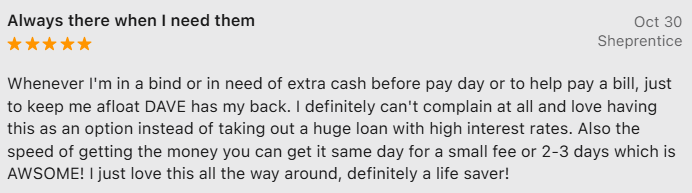
However, we suppose it’s hardly possible to run an app serving over 12 million people without the occasional hiccup.
For example, the Reddit user above mentions “weird charges” from states they’ve never visited, and says, “I decided I will be closing my account with Dave” after comments from others who have experienced similar issues.
Dave alternatives
How does Dave compare to the best banking and cash advance apps? Explore a few options to find the best fit.
$0 to Dave account


Dave vs. EarnIn
Unlike Dave, EarnIn offers a free basic membership. It allows cash advances of up to $1,000 per pay period, but capped at $150 per day, so you can access a larger lump sum with Dave.
While Dave is an all-in-one banking app, EarnIn focuses on paycheck advances. It also has a Tip Yourself savings feature but doesn’t provide an APY.
Dave vs. Tilt
Tilt (formerly Empower) lets qualified users access cash advances of up to $400. While the advances are interest-free, Tilt charges $8 per month for a basic subscription and additional fees for instant transfers. So compared to Dave, the app offers lower advances for higher fees.
However, Tilt features more in-app budgeting tools that help users monitor their credit score, track spending, and set up automatic savings. It also offers credit cards and lines of credit for qualifying users.
Dave vs. Brigit
Like Dave, Brigit allows cash advances of up to $500, but that’s only available for Plus ($8.99 a month) and Premium ($14.99 a month) users. Premium users are eligible for instant transfers at no extra cost.
Dave is more of a bank-style app, while Brigit emphasizes credit monitoring, credit building, and money management tools. Similar to Dave, it also gives access to side gigs.
How to get started with Dave
Setting up a Dave account is easy and takes no more than a few minutes. You’ll need to:
- Download the app. Dave is available for iOS and Android.
- Create an account using your email and phone number.
- Link an existing bank account.

To open a Dave checking account, you must verify your ID. The app will likely ask for your date of birth, physical address, and Social Security number.
Is Dave worth it?
Dave is a convenient app for everyday money management and stopgap cash advances. It’s easy to use and competitively priced compared to similar fintech apps. Still, beware of potential fees, like instant transfer charges, that can add up with frequent use.
Article sources
At LendEDU, our writers and editors rely on primary sources, such as government data and websites, industry reports and whitepapers, and interviews with experts and company representatives. We also reference reputable company websites and research from established publishers. This approach allows us to produce content that is accurate, unbiased, and supported by reliable evidence. Read more about our editorial standards.
- Dave, Goals Account Agreement
- Dave, ExtraCash Account Fee Schedule
- Dave, Dave Completes Transition to Simplified Fee Structure
- App Store for iPhone, Dave: Credit, Cash & Money App – Ratings & Reviews
About our contributors
-
 Written by Anna Twitto
Anna Twitto is a money management writer passionate about financial freedom and security. Anna loves sharing tips and strategies for smart personal finance choices, saving money, and getting and staying out of debt.
-
 Edited by Kristen Barrett, MAT
Kristen Barrett is a managing editor at LendEDU. She lives in Cincinnati, Ohio, with her wife and their pack of senior rescue dogs. She has edited and written personal finance content since 2015.