


Saving money shouldn’t require a spreadsheet and a personality makeover. The best money-saving apps do the heavy lifting for you: They nudge a few dollars aside every couple of days, round up your purchases, or automate the boring stuff so you actually stick with it.
Below, we’ve rounded up the most useful apps that help save money for different situations, whether you want hands-off savings, goal tracking, round-ups, or a cash buffer before payday.


Not everyone will qualify. Offers range from $10-$500 and can go up with on-time payments. In Q2 2026, the average offer was $98 for first-time customers and $172 for all others. Instant delivery is optional—see fees in Tilt’s Terms.
Tilt offers a 14-day trial for new customers followed by an auto-recurring $8/month subscription fee. Cancel anytime.
Not everyone will qualify. Offers range from $10-$500 and can go up with on-time payments. In Q2 2026, the average offer was $98 for first-time customers and $172 for all others. Instant delivery is optional—see fees in Tilt’s Terms.
Tilt offers a 14-day trial for new customers followed by an auto-recurring $8/month subscription fee. Cancel anytime.
Not everyone will qualify. Offers range from $10-$500 and can go up with on-time payments. In Q2 2026, the average offer was $98 for first-time customers and $172 for all others. Instant delivery is optional—see fees in Tilt’s Terms.
Tilt offers a 14-day trial for new customers followed by an auto-recurring $8/month subscription fee. Cancel anytime.


Table of Contents
Research consistently shows automation boosts follow-through. When saving happens in the background, you don’t need to rely on willpower. And as a result, you save more with less effort.
What are money-saving apps, and how do they work?
Money-saving apps help you set money aside automatically (or painlessly) so your savings stack up over time. Most apps do one or more of the following:
- Insights: Nudges, alerts, and spending trends to keep you consistent.
- Automated transfers: Move small amounts to savings on a schedule you set (daily/weekly/payday).
- Round-ups: Round each purchase to the nearest dollar and save the change.
- Savings goals and envelopes: Create labeled buckets for goals like emergency funds and travel (while also helping you track progress).
- Autosave rules: This could be something like: save when X happens (paycheck hits, you get a refund, you spend at a certain store).
- High-yield savings (APY): You can use some apps to save money and earn interest on your balance inside the app or linked account.
- Cash buffer tools: Some saving apps provide small, no-interest cash advances to bridge the gap before payday (with fees or optional tips).
Here’s more about each of our picks for the best money-saving apps.
1. EarnIn
Why we like EarnIn’s Tip Yourself
Cost: Free
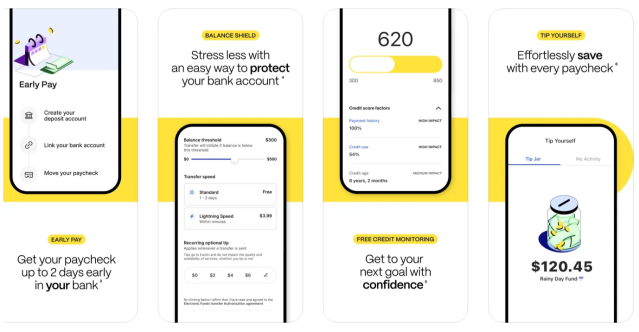
EarnIn’s “Tip Yourself” feature makes saving painless. You can set up to five “Tip Jars,” add money manually or with AutoSave on payday, and pull it back whenever you need it.
There are no fees, no minimums, and your cash sits in an FDIC-insured account. (And quick bonus: EarnIn also has one of the best cash advance apps if you need money before payday.)
- Up to 5 Tip Jars
- Save up to $100 per day
- AutoSave on payday or custom schedule
- Free withdrawals back to your bank
- No fees
- Free, instant $100 cash advance for qualifying first-time users
- No interest earned on savings
Our experience using EarnIn
We like how easy it is to create multiple jars and watch the progress build visually in the app. Transfers back to a bank account are generally fast, and the AutoSave rules are simple to toggle on or off. It feels like a digital upgrade to cash envelopes, except you don’t earn any interest on your savings.
2. Tilt
Why we like Tilt’s AutoSave feature
Cost: $8/month
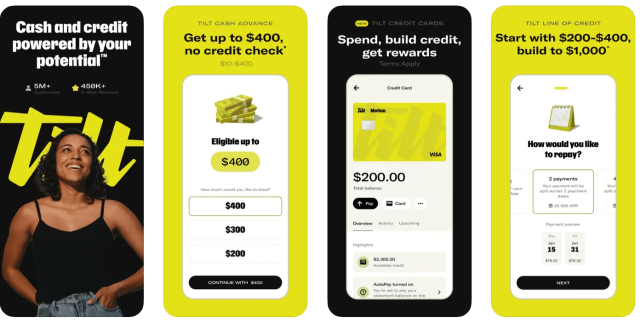
Tilt (formerly Empower) is a great app that helps you save money because it uses AI to analyze your income and expenses, then automatically moves money into savings when your budget allows.
You can set goals, choose a weekly plan or paycheck-based transfers, and the app adjusts in real time to avoid overdrafts. Savings live in an FDIC-insured account with nbkc bank, and you can transfer money out anytime.
- AI-driven AutoSave rules
- Weekly or paycheck transfer options
- Adjustable savings goals
- FDIC-insured account via nbkc bank
- Pause or edit AutoSave anytime
- No interest earned on savings
- Monthly fee
Our experience using Tilt
We like that Tilt’s AutoSave doesn’t feel like guesswork. It automatically times transfers around cash flow (aka when you get paid) and is easy to pause when you need it. The app feels smarter than a fixed savings rule, and being able to move money out instantly can give peace of mind if you find yourself in a crunch.
What our expert thinks
I think Tilt is an excellent savings app that stands out for its ease of use and thoughtful features. It streamlines the saving process through automation, fosters accountability by allowing users to create savings communities with friends or family, and incorporates motivating, engaging elements that make saving feel less like a chore.
Feedback from others has also highlighted how enjoyable and encouraging the app is compared to more rigid financial tools.

3. Dave
Why we like Dave’s Goals account
Cost: Up to $5/month
Dave is one of the best apps to save money and earn interest because its Goals account pays 4.00% APY, with no minimums or hidden fees. You can set personalized goals, make automatic transfers, and even round up debit card purchases to save spare change.
On top of that, the Side Hustle feature connects you to surveys and more than 1,000 flexible gigs and side hustles so you can grow your income right from the app.
- 4.00% APY on Goals Account
- Automatic transfers and round-ups
- Personalized savings goals
- No minimum deposits or hidden fees
- Side Hustle board with gigs and surveys
Our experience using Dave
We love Dave’s Goals Account for saving money and earning interest. You can literally name the account what you’re saving for and track milestones. The 4% APY is competitive, and Round Ups make saving effortless in the background. Side Hustle is a bonus: It’s rare to see a savings app that also helps you earn more.

4. Current
Why we like Current Save
Cost: Free
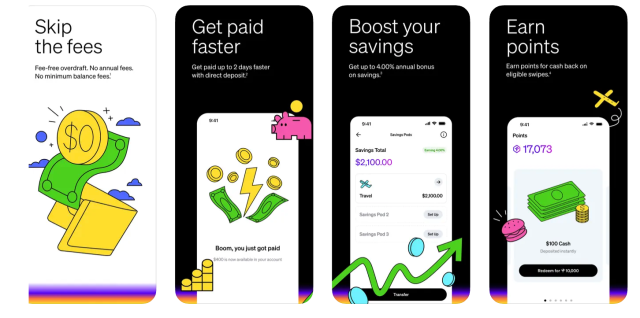
If you like the idea of creating little pods for all your savings goals, Current is for you. This money saving app helps you organize savings into up to three “Pods” for different goals, like travel or emergencies. You can fund pods directly, link an outside bank, or turn on Round-Ups to stash spare change from every debit card purchase.
With qualifying direct deposits, pods can earn up to 4.00% annually (0.25% if not). Money is FDIC-insured through partner banks, and you can move funds in and out anytime with no penalties.
- Create up to 3 savings pods
- Round-ups on debit purchases
- Up to 4.00% annual bonus with direct deposit
- FDIC-insured funds via partner banks
- No minimum balance required
Our experience using Current
We like how easy it is to label and track multiple savings goals inside Current. Round-ups make saving almost invisible, and the ability to boost earnings to 4% APY with direct deposit is an excellent benefit. It feels like a modern, flexible take on envelope budgeting. If you’re looking for a free round-up savings app, Current could be for you.
What our expert thinks
I recommend Current for individuals who prefer organizing their savings into customizable buckets, or Pods. The fact that the app is free adds further value.
About our contributors
-
 Written by Cassidy Horton, MBA
Cassidy Horton has been featured in USA Today, Yahoo Finance, PayPal, MarketWatch, The Balance, Prosper, and other leading media outlets.
-
 Edited by Kristen Barrett, MAT
Kristen Barrett is a managing editor at LendEDU. She lives in Cincinnati, Ohio, with her wife and their pack of senior rescue dogs. She has edited and written personal finance content since 2015.
-
 Reviewed by Erin Kinkade, CFP®
Erin Kinkade, CFP®, ChFC®, works as a financial planner at AAFMAA Wealth Management & Trust. Erin prepares comprehensive financial plans for military veterans and their families.